“Cut and Paste” is the simplest way to move data from one place to another.
No doubt you have used your mouse to high–light text before?
All you do is “left–click” your Mouse, while your Cursor (that little Arrow thing) is right at the beginning of the text you want to copy.
Then you (while holding down the left button) “drag” the mouse cursor down to the end of the text you want.

Look at this simple example of highlighed text:
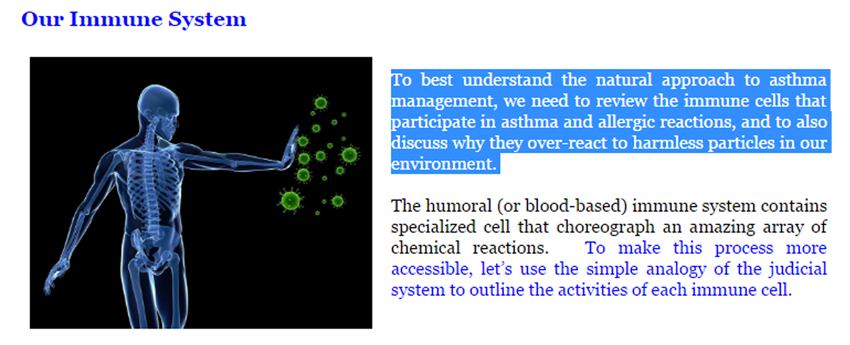
Do that now... “highlight” this paragraph. Notice how it turned blue? Excellent work!
The next trick is to Copy that information.
If you hold down the CTRL (control) key, and then "tap" the letter "C" key
(without the quotation marks of course –––> CTRL C ),
you will have copied that hilighted text to the Clipboard,
a temporary memory bank in Windows.
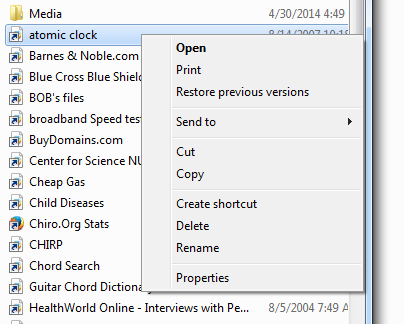
NOTE: You can also use the COPY feature to capture any object, be it a graphic, a document, or a shortcut. All you do is place the Mouse Cursor over the object (name of the document) that you want to copy, and then Right Click.
When you do, a Box like this appears.
Simply pull down to COPY and Left Click once.
The next trick is how to PASTE that information somewhere else.
First, you will open the document where you want to move that highlighted text.
That might be a word processing document (like Word, WordPad or even NotePad)
or a newly opened e–mail document.
Or, if you have copied some Object, like a graphic, document, or a shortcut
then simply open the Folder where you want to store it.
The KEY is to paste it into an empty space.
Next, you will move your mouse cursor over the place you want to paste that information
and hit CTRL V. Notice how the text (or the Object) just "drops" onto the page or Folder?
Isn't that cool!
NOTE: Depending on WHAT text you copy, some word processors may copy
all the information, including the fonts and formatting intact, and some won't.
You'll learn quickly if you may require a "high–end" word processor like MS Word
or whether "Write" or "Notepad" is all you need for the task–at–hand.

© 2001 and 2023
ACAPress/HealthQuest Newsletter and Frank M. Painter, D.C.
All Rights Reserved
|